

Runtime Intelligence
for AI Agents
Critiqor observes AI agent runs across Codex, Claude Code, OpenClaw, and custom CLI workflows, then turns runtime evidence into diagnoses your team can trust and act on.
$ pip install critiqor OpenClaw
 Codex
Codex Claude Code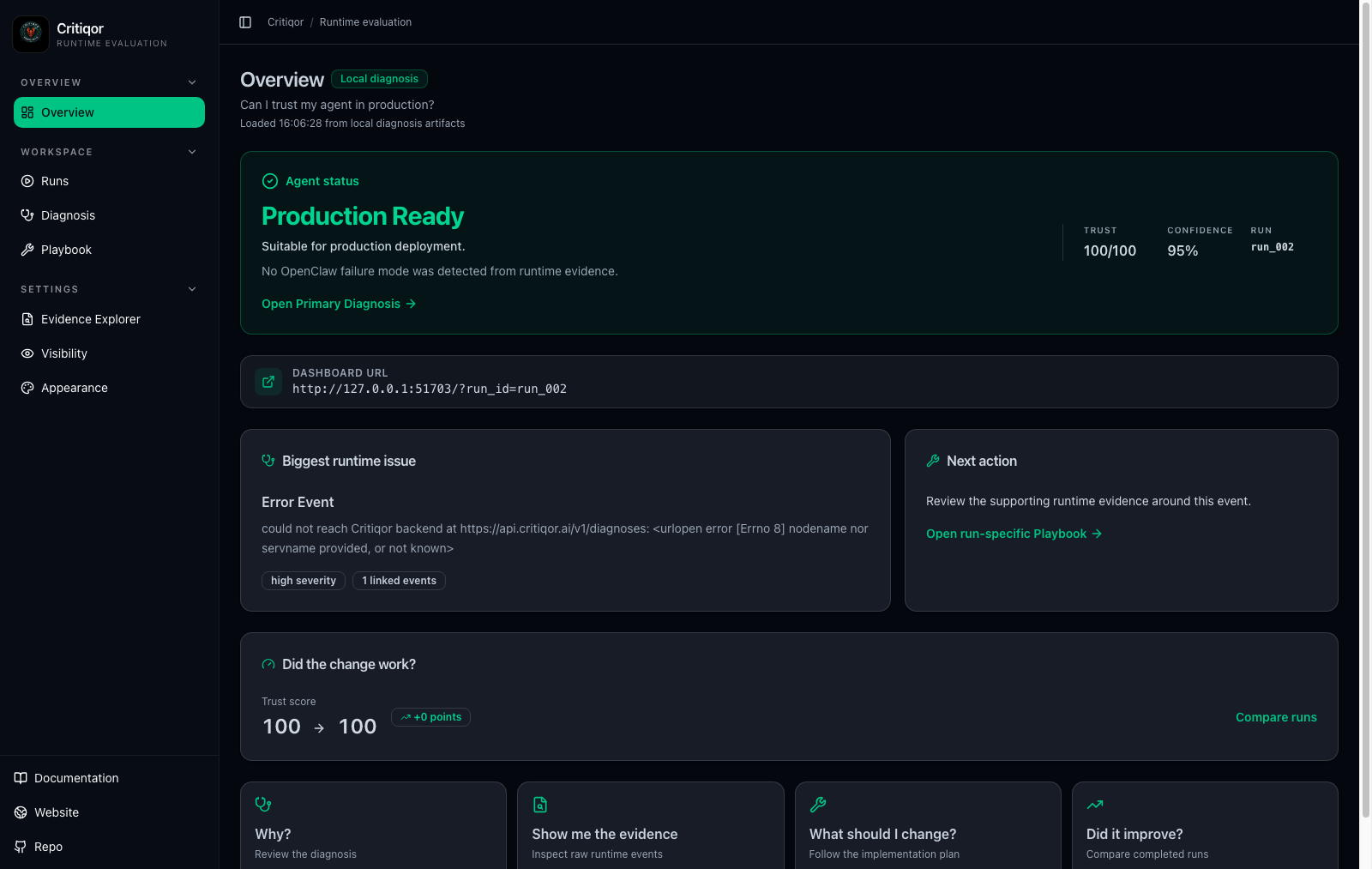
Traditional evals judge the answer.
Critiqor watches the work.
Most evaluation frameworks score the final response. Critiqor instead observes the agent during execution — recording tool calls, tool outputs, runtime events, reasoning flow, execution efficiency and evidence utilisation.
Every diagnosis is backed by observable execution evidence — not a model's opinion about itself.
Answer-only scoring
- Final response only
- Self-reported reasoning
- Limited explainability
- No runtime visibility
Evidence-backed diagnosis
- Runtime evidence
- Observable execution
- Explainable diagnosis
- Root cause analysis
- Historical intelligence
Everything you need to trust your agents.
A developer-first workflow for observing AI agent runs, reviewing reliability, and improving behavior over time.
Runtime Observation
Start Critiqor before an agent run so your review is based on observed behavior, not only the final answer.
Reliability Reports
Get a clear report with a production verdict, linked evidence, diagnosis, playbook, and exportable fix prompt.
Memory Evaluation
Review retrieved, used, ignored, missed, or not-stored memory behavior when the runtime emits memory evidence.
Run Comparison
Use previous runs to compare prompt changes, tool updates, model changes, and reliability improvements.
Dashboard Review
Move from terminal execution to Overview, Runs, Diagnosis, Playbook, Evidence Explorer, Visibility, and Appearance views.
Framework Choice
Monitor OpenClaw, Claude Code, Codex, or configure a custom framework from the CLI.
Learn Critiqor quickly.
The website now points developers to what matters: what Critiqor does, how to install it, how to run it, and how to interpret the dashboard.
What Critiqor is
A short introduction to runtime intelligence and why final-answer checks miss important agent behavior.
Install the CLI
Requirements, PyPI install command, verification, update, and uninstall notes.
Run your first session
Choose a framework, use the agent normally, then finalize and review the dashboard.
CLI reference
Every command in one place: monitor, finalize, dashboard, runs, check, and help.
Read the dashboard
Learn how to interpret the production verdict, diagnosis, playbook, evidence, exports, and settings.
Review previous runs
Use historical runs to compare agent changes, spot regressions, and track improvement over time.
Trust scores
Understand High, Moderate, and Low reliability signals and how to use them in review workflows.
Policy checks
Use Critiqor in deployment review by defining reliability thresholds for agent changes.
From terminal to dashboard.
Configure a framework once, start an observation, use the agent normally, finalize the run, then review the evidence-backed dashboard.
Install Critiqor
Install the CLI from PyPI in your Python environment.
$ pip install critiqorChoose your framework
Use the guided setup for OpenClaw, Claude Code, Codex, or a custom CLI command.
$ critiqor agentsUse your agent normally
Ask questions, test prompts, and work through realistic tasks without replacing your agent workflow.
$ critiqor monitor codexFinalize the run
End the observation and open the dashboard with a reliability report.
$ critiqor finalizeRead the full quickstart$ critiqor monitor openclaw✓ Framework selected: OpenClaw✓ Runtime observer attached✓ Event collection activeLaunching agent...Agent CLI ready› review this agent response for reliability risksAgent completed the task.› /exit$ critiqor finalizeStopping observer...Finalizing observation...Preparing reliability report...Launching dashboard...
A reliability report your team can act on.
Critiqor opens a focused dashboard after a run so developers can answer five practical questions: can I trust this agent, why, what evidence supports it, what should change, and did the change work?
Production Verdict
See whether the agent is production ready, needs review, or should be treated with caution.
Diagnosis
Understand the primary issue, why it matters, and which evidence supports the finding.
Playbook
Turn the diagnosis into concrete next steps, verification checks, and expected improvement.
Evidence Explorer
Inspect the timeline, tool events, memory behavior, and raw runtime snapshots behind the report.
Export + Fix Prompt
Export PDF, Markdown, snapshots, or copy a run-specific prompt for improving the agent.
Overview + Runs
Production verdict, trust score, confidence, and previous run access.
Visibility
Private, Shared, Anonymous, and Public modes from the developer's point of view.
Appearance
Readable light and dark dashboard modes for review and sharing.
Install Critiqor. Review your run.
One pip install, a guided framework choice, and a dashboard report you can revisit.
$ pip install critiqor$ critiqor agents$ critiqor finalizeRead the docs.
Every surface of Critiqor documented for engineers — concise, complete, runnable.
Quickstart
Install Critiqor, choose a framework, finalize a run, and review your first report.
Installation
PyPI setup, Python requirements, verification, updates, and uninstall steps.
CLI Commands
Configure frameworks, monitor agents, finalize runs, reopen dashboards, and list history.
Dashboard Guide
How to read the verdict, diagnosis, playbook, evidence explorer, exports, and settings.
Runs History
Review previous sessions, compare changes, and track reliability over time.
Trust Score
Understand High, Moderate, and Low reliability signals before depending on a run.
Policy Checks
Use reliability thresholds as a local or CI review step before shipping changes.
FAQ
Privacy, supported frameworks, multiple runs, updates, and common usage questions.
Stay in the loop.
Docs, source, plugins and the conversation around runtime intelligence.
Questions, answered.
Everything developers ask before adopting Critiqor.